 Drink the Ocean
Merge a Rocket!
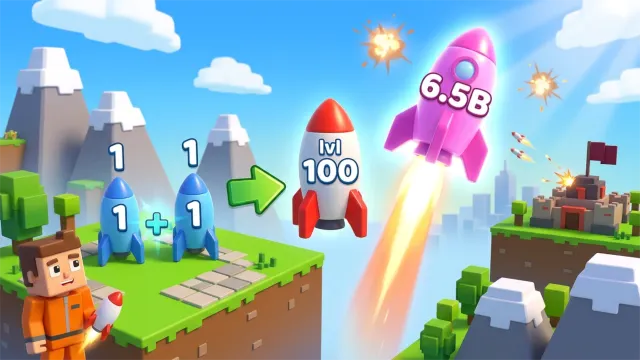
Build a stronger rocket by carrying one to another of the same level. You can launch it at the enemy base or drop it and keep merging.
For more room on a phone, rotate to landscape.
Game helpOther games to play
Browse all games
Make the next rocket tier
Walk up to a rocket to pick it up. Take it to a matching rocket to merge them. If you want to set yours aside, use Drop. Use Launch when you want to attack the enemy base.
When to use your shield
Save the Shield button for an incoming attack. Between attacks, look at the Upgrades menu to see what you can buy with coins and whether you can carry more rockets. Rebirth starts another run in exchange for a bonus. Read the in-game prompt before resetting.
Desktop and phone controls
On desktop, move with WASD or the arrow keys, look with the mouse, and jump with Space. On a phone, the on-screen stick moves you and a swipe turns the view. Launch, Drop and Shield have their own buttons.
Practice a pickup and launch loop
- Choose two rockets close together with the same level. Carry the first to the second, then check the level on the new rocket before leaving the pickup area.
- Use Launch once to learn where to find it under pressure. On the next trip, keep the rocket and use Drop to leave it near a matching pickup. This gives you a way to choose between an immediate attack and building a higher tier.
- If you see an incoming attack while still carrying a rocket, use the shield first and finish the merge after the danger passes.
What if the player stays blank?
Select Reload below the player. Follow the prompt inside Playgama when it appears. On a phone, rotate to landscape or try fullscreen for more room.
Pinidi Studio developed the game. Playgama provides the player and documents the controls. Playgama game listing.